
Arduino - LED de codificador rotatorio
En este tutorial, vamos a aprender cómo programar Arduino para controlar el brillo de un LED según el valor de salida del codificador rotatorio.
Hardware Requerido
Or you can buy the following kits:
| 1 | × | DIYables STEM V3 Starter Kit (Arduino included) | |
| 1 | × | DIYables Sensor Kit (18 sensors/displays) |
Divulgación: Algunos de los enlaces proporcionados en esta sección son enlaces de afiliado de Amazon. Podemos recibir una comisión por las compras realizadas a través de estos enlaces sin costo adicional para usted. Apreciamos su apoyo.
Buy Note: Use the LED Module for easier wiring. It includes an integrated resistor.
Acerca de LED y codificador rotatorio
Si no sabes nada sobre LED y codificador rotatorio (disposición de pines, cómo funciona, cómo programarlo ...), aprende sobre ellos en los siguientes tutoriales:
Diagrama de Cableado
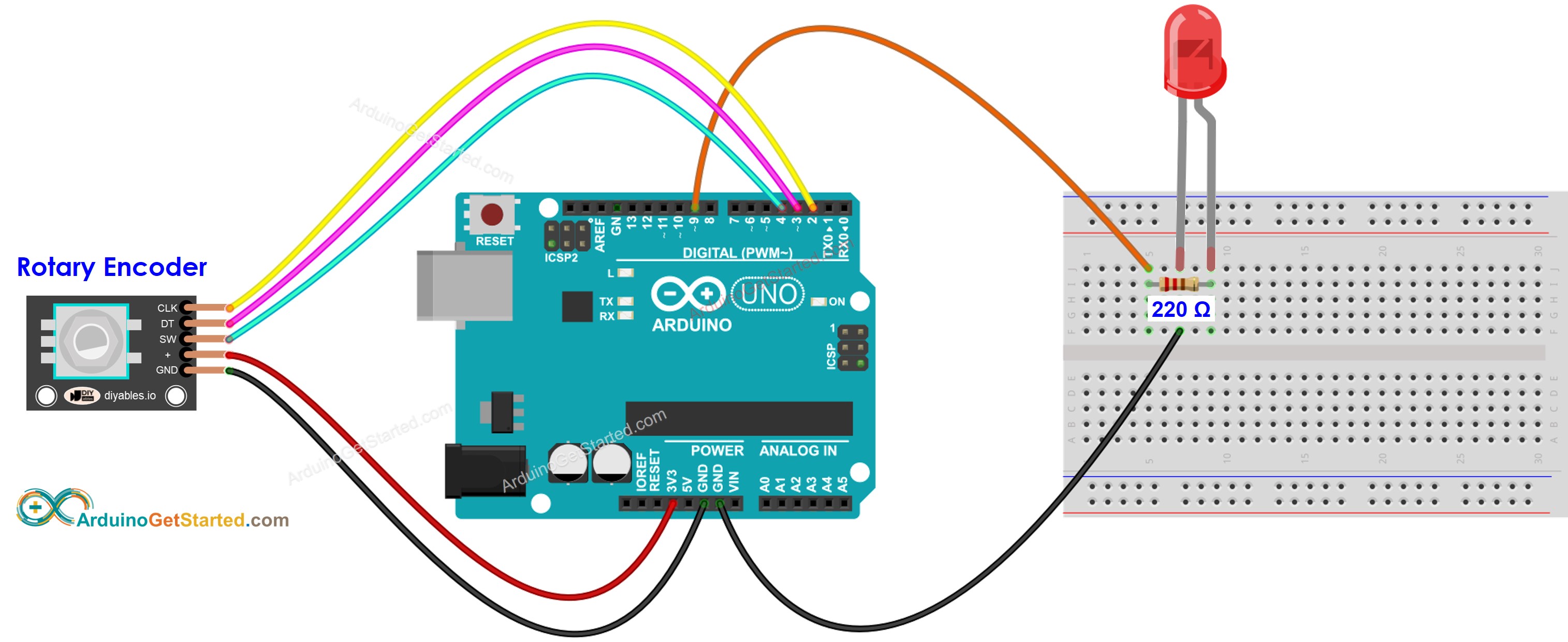
This image is created using Fritzing. Click to enlarge image
Código de Arduino
/*
* Este código de Arduino fue desarrollado por es.newbiely.com
* Este código de Arduino se proporciona al público sin ninguna restricción.
* Para tutoriales completos y diagramas de cableado, visite:
* https://es.newbiely.com/tutorials/arduino/arduino-rotary-encoder-led
*/
#include <Servo.h>
#define CLK_PIN 2
#define DT_PIN 3
#define SW_PIN 4
#define LED_PIN 9
#define DIRECTION_CW 0 // clockwise direction
#define DIRECTION_CCW 1 // counter-clockwise direction
int counter = 0;
int direction = DIRECTION_CW;
int CLK_state;
int prev_CLK_state;
int brightness = 125; // middle value
void setup() {
Serial.begin(9600);
// configure encoder pins as inputs
pinMode(CLK_PIN, INPUT);
pinMode(DT_PIN, INPUT);
// read the initial state of the rotary encoder's CLK pin
prev_CLK_state = digitalRead(CLK_PIN);
pinMode(LED_PIN, OUTPUT);
}
void loop() {
// read the current state of the rotary encoder's CLK pin
CLK_state = digitalRead(CLK_PIN);
// If the state of CLK is changed, then pulse occurred
// React to only the rising edge (from LOW to HIGH) to avoid double count
if (CLK_state != prev_CLK_state && CLK_state == HIGH) {
// if the DT state is HIGH
// the encoder is rotating in counter-clockwise direction => decrease the counter
if (digitalRead(DT_PIN) == HIGH) {
direction = DIRECTION_CCW;
counter--;
brightness -= 10; // you can change this value
} else {
// the encoder is rotating in clockwise direction => increase the counter
direction = DIRECTION_CW;
counter++;
brightness += 10; // you can change this value
}
if (brightness < 0)
brightness = 0;
else if (brightness > 255)
brightness = 255;
// sets the brightness of LED according to the counter
analogWrite(LED_PIN, brightness);
Serial.print("COUNTER: ");
Serial.print(counter);
Serial.print(" | BRIGHTNESS: ");
Serial.println(brightness);
}
// save last CLK state
prev_CLK_state = CLK_state;
}
Pasos R\u00e1pidos
- Conecta Arduino a la PC mediante un cable USB
- Abre el IDE de Arduino, selecciona la placa correcta y el puerto correcto
- Copia el código anterior y ábrelo con el IDE de Arduino
- Haz clic en el botón Subir del IDE de Arduino para subir el código al Arduino
- Abre el Monitor Serial
- Gira el codificador rotatorio
- Observa el brillo del LED
- Observa el resultado en el Monitor Serial
8
Serial.println("Hello World!");
Message (Enter to send message to 'Arduino Uno' on 'COM15')
New Line
9600 baud
COUNTER: 1 | BRIGHTNESS: 135
COUNTER: 2 | BRIGHTNESS: 145
COUNTER: 3 | BRIGHTNESS: 155
COUNTER: 4 | BRIGHTNESS: 165
COUNTER: 5 | BRIGHTNESS: 175
COUNTER: 6 | BRIGHTNESS: 185
COUNTER: 7 | BRIGHTNESS: 195
Explicación del código
¡Lee la explicación línea por línea en las líneas de comentario del código fuente!
Video Tutorial
Estamos considerando crear tutoriales en video. Si considera que los tutoriales en video son importantes, suscríbase a nuestro canal de YouTube para motivarnos a crear los videos.