
Arduino - Reproductor MP3

En este tutorial, aprenderemos cómo hacer un reproductor MP3 utilizando Arduino, un módulo reproductor MP3, una tarjeta microSD y un altavoz. Los archivos MP3 (música o audio grabado) se almacenan en la tarjeta microSD. Luego, Arduino puede controlar el módulo reproductor MP3 para leer una canción seleccionada de la tarjeta SD, convertirla en una señal de audio y enviar la señal al altavoz. En detalle, aprenderemos:

Luego, puedes modificar el código para añadir un potenciómetro o un codificador giratorio para cambiar el volumen.

Acerca del módulo reproductor MP3 en serie y del altavoz

Pinout del módulo de reproductor MP3 en serie

Un módulo reproductor de MP3 en serie tiene tres interfaces:

  • La interfaz hacia Arduino incluye 4 pines:
    • Pin RX: pin de datos, necesita conectarse a un pin TX de Arduino (Serial Hardware o Software)
    • Pin TX: pin de datos, necesita conectarse a un pin RX de Arduino (Serial Hardware o Software)
    • Pin VCC: pin de alimentación, necesita conectarse a VCC (5V)
    • Pin GND: pin de alimentación, necesita conectarse a GND (0V)
  • La interfaz hacia el altavoz es un conector hembra de salida auxiliar de 3,5 mm.
  • La interfaz hacia la tarjeta Micro SD es un zócalo para tarjeta Micro SD en la parte trasera del módulo.
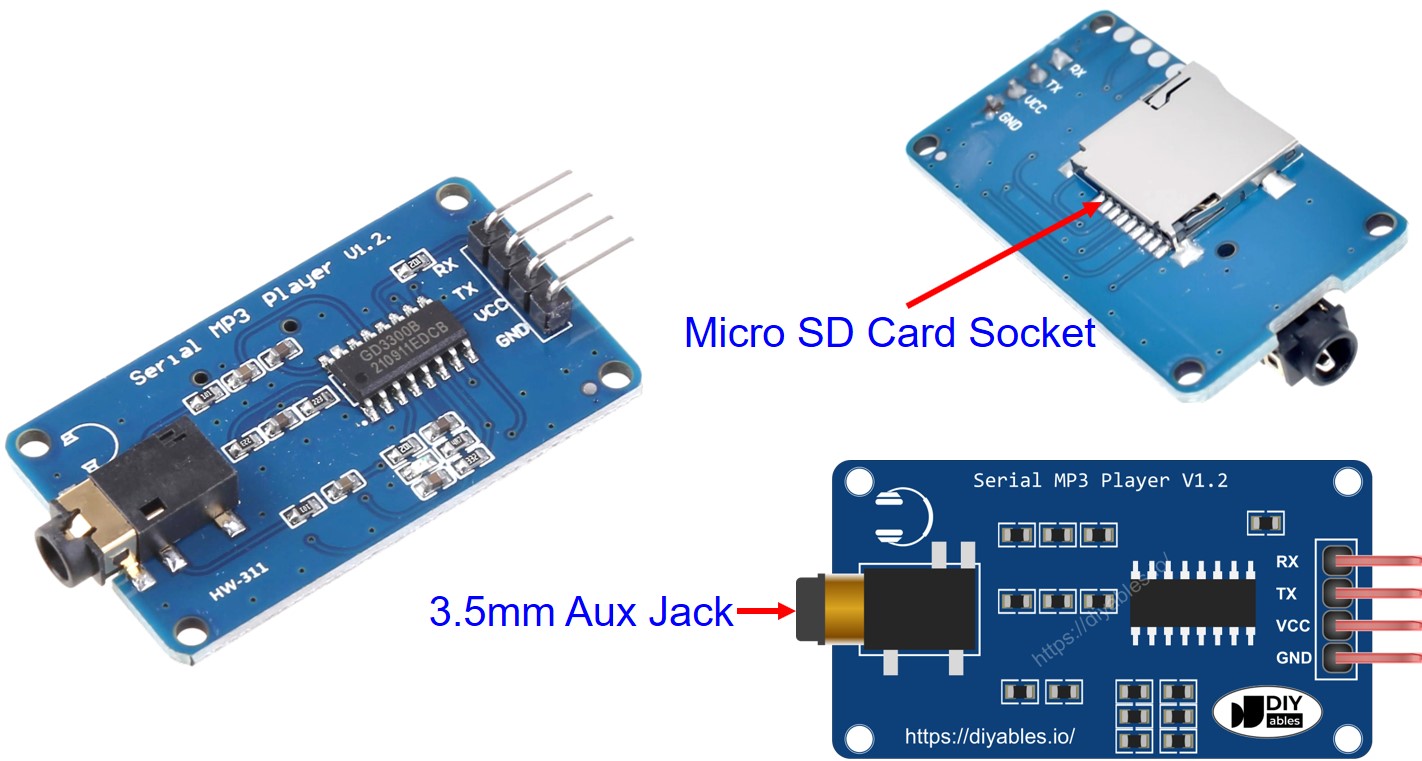
Pinout del módulo reproductor MP3 en serie
image source: diyables.io

Pinout del altavoz

Un altavoz suele tener dos interfaces:

  • Interfaz de señal de audio: es un conector macho AUX de 3,5 mm que se conecta al módulo reproductor de MP3
  • Interfaz de alimentación: puede ser USB, un adaptador de corriente de 5 V o cualquier otra interfaz de alimentación

Cómo funciona

Lo que necesitamos preparar:

  • Almacenar previamente una lista de canciones o audio grabado que queremos reproducir en la tarjeta microSD.
  • Inserte la tarjeta microSD en el módulo reproductor de MP3.
  • Conecte el módulo reproductor de MP3 al Arduino.
  • Conecte el altavoz al módulo reproductor de MP3 a
  • Conecte el altavoz a una fuente de alimentación.

Cada archivo MP3 almacenado en la tarjeta microSD tendrá un índice. El índice es el orden de las canciones almacenadas, empezando desde 0.

Luego podemos programar Arduino para enviar comandos al módulo reproductor de MP3. Admite los siguientes comandos:

  • Reproducir
  • Pausar
  • Reproducir siguiente
  • Reproducir anterior
  • Ajustar volumen

Cuando el módulo reproductor de MP3 lee el archivo MP3 desde la tarjeta microSD, lo convierte en una señal de audio y la envía al altavoz a través de la interfaz auxiliar de 3,5 mm.

Diagrama de Cableado
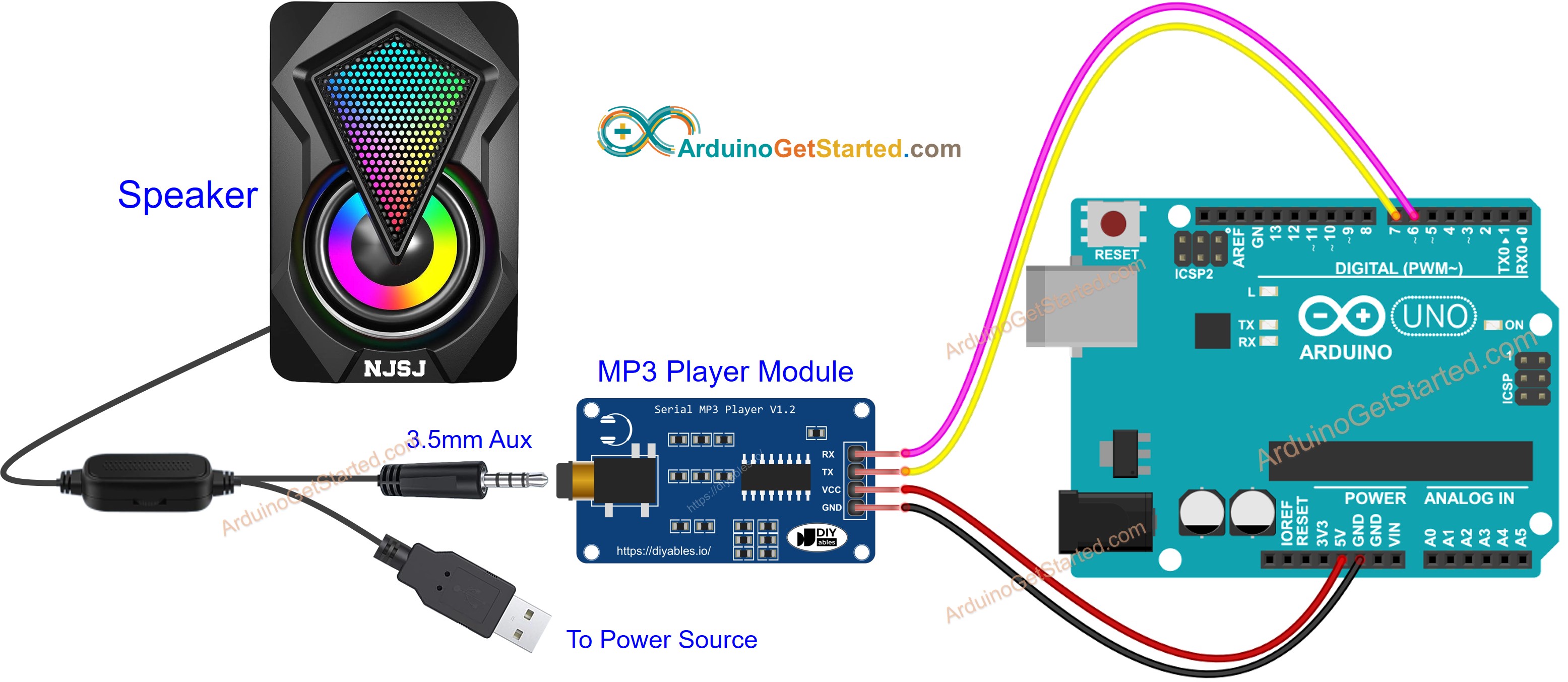
Diagrama de cableado del módulo reproductor MP3 de Arduino

This image is created using Fritzing. Click to enlarge image

Código de Arduino - Reproducir música

El código siguiente reproduce la primera canción almacenada en la tarjeta microSD.

/* * Este código de Arduino fue desarrollado por es.newbiely.com * Este código de Arduino se proporciona al público sin ninguna restricción. * Para tutoriales completos y diagramas de cableado, visite: * https://es.newbiely.com/tutorials/arduino/arduino-mp3-player */ #include <SoftwareSerial.h> #define CMD_PLAY_NEXT 0x01 #define CMD_PLAY_PREV 0x02 #define CMD_PLAY_W_INDEX 0x03 #define CMD_SET_VOLUME 0x06 #define CMD_SEL_DEV 0x09 #define CMD_PLAY_W_VOL 0x22 #define CMD_PLAY 0x0D #define CMD_PAUSE 0x0E #define CMD_SINGLE_CYCLE 0x19 #define DEV_TF 0x02 #define SINGLE_CYCLE_ON 0x00 #define SINGLE_CYCLE_OFF 0x01 #define ARDUINO_RX 7 // Arduino Pin connected to the TX of the Serial MP3 Player module #define ARDUINO_TX 6 // Arduino Pin connected to the RX of the Serial MP3 Player module SoftwareSerial mp3(ARDUINO_RX, ARDUINO_TX); void setup() { Serial.begin(9600); mp3.begin(9600); delay(500); // wait chip initialization is complete mp3_command(CMD_SEL_DEV, DEV_TF); // select the TF card delay(200); // wait for 200ms mp3_command(CMD_PLAY, 0x0000); // Play mp3 //mp3_command(CMD_PAUSE, 0x0000); // Pause mp3 //mp3_command(CMD_PLAY_NEXT, 0x0000); // Play next mp3 //mp3_command(CMD_PLAY_PREV, 0x0000); // Play previous mp3 //mp3_command(CMD_SET_VOLUME, 30); // Change volume to 30 } void loop() { } void mp3_command(int8_t command, int16_t dat) { int8_t frame[8] = { 0 }; frame[0] = 0x7e; // starting byte frame[1] = 0xff; // version frame[2] = 0x06; // the number of bytes of the command without starting byte and ending byte frame[3] = command; // frame[4] = 0x00; // 0x00 = no feedback, 0x01 = feedback frame[5] = (int8_t)(dat >> 8); // data high byte frame[6] = (int8_t)(dat); // data low byte frame[7] = 0xef; // ending byte for (uint8_t i = 0; i < 8; i++) { mp3.write(frame[i]); } }

Pasos R\u00e1pidos

  • Siga las instrucciones en Cómo Funciona
  • Copie el código anterior y ábralo con Arduino IDE
  • Haga clic en el botón Subir en Arduino IDE para cargar el código en Arduino
  • Disfrute de la música

Código de Arduino: Reproducir música con botones de control

El código a continuación es una mejora del código anterior. Añade cuatro botones para que puedas interactuar con el reproductor de MP3.

/* * Este código de Arduino fue desarrollado por es.newbiely.com * Este código de Arduino se proporciona al público sin ninguna restricción. * Para tutoriales completos y diagramas de cableado, visite: * https://es.newbiely.com/tutorials/arduino/arduino-mp3-player */ #include <SoftwareSerial.h> #include <ezButton.h> #define CMD_PLAY_NEXT 0x01 #define CMD_PLAY_PREV 0x02 #define CMD_PLAY_W_INDEX 0x03 #define CMD_SET_VOLUME 0x06 #define CMD_SEL_DEV 0x09 #define CMD_PLAY_W_VOL 0x22 #define CMD_PLAY 0x0D #define CMD_PAUSE 0x0E #define CMD_SINGLE_CYCLE 0x19 #define DEV_TF 0x02 #define SINGLE_CYCLE_ON 0x00 #define SINGLE_CYCLE_OFF 0x01 #define ARDUINO_RX 7 // Arduino Pin connected to the TX of the Serial MP3 Player module #define ARDUINO_TX 6 // Arduino Pin connected to the RX of the Serial MP3 Player module SoftwareSerial mp3(ARDUINO_RX, ARDUINO_TX); ezButton button_play(2); // create ezButton object that attach to pin 2 ezButton button_pause(3); // create ezButton object that attach to pin 3 ezButton button_next(4); // create ezButton object that attach to pin 4 ezButton button_prev(5); // create ezButton object that attach to pin 5 void setup() { Serial.begin(9600); mp3.begin(9600); delay(500); // wait chip initialization is complete mp3_command(CMD_SEL_DEV, DEV_TF); // select the TF card delay(200); // wait for 200ms button_play.setDebounceTime(50); // set debounce time to 50 milliseconds button_pause.setDebounceTime(50); // set debounce time to 50 milliseconds button_next.setDebounceTime(50); // set debounce time to 50 milliseconds button_prev.setDebounceTime(50); // set debounce time to 50 milliseconds } void loop() { button_play.loop(); // MUST call the loop() function first button_pause.loop(); // MUST call the loop() function first button_next.loop(); // MUST call the loop() function first button_prev.loop(); // MUST call the loop() function first if (button_play.isPressed()) { Serial.println("Play mp3"); mp3_command(CMD_PLAY, 0x0000); } if (button_pause.isPressed()) { Serial.println("Pause mp3"); mp3_command(CMD_PAUSE, 0x0000); } if (button_next.isPressed()) { Serial.println("Play next mp3"); mp3_command(CMD_PLAY_NEXT, 0x0000); } if (button_prev.isPressed()) { Serial.println("Play previous mp3"); mp3_command(CMD_PLAY_PREV, 0x0000); } } void mp3_command(int8_t command, int16_t dat) { int8_t frame[8] = { 0 }; frame[0] = 0x7e; // starting byte frame[1] = 0xff; // version frame[2] = 0x06; // the number of bytes of the command without starting byte and ending byte frame[3] = command; // frame[4] = 0x00; // 0x00 = no feedback, 0x01 = feedback frame[5] = (int8_t)(dat >> 8); // data high byte frame[6] = (int8_t)(dat); // data low byte frame[7] = 0xef; // ending byte for (uint8_t i = 0; i < 8; i++) { mp3.write(frame[i]); } }

El diagrama de cableado para el código anterior:
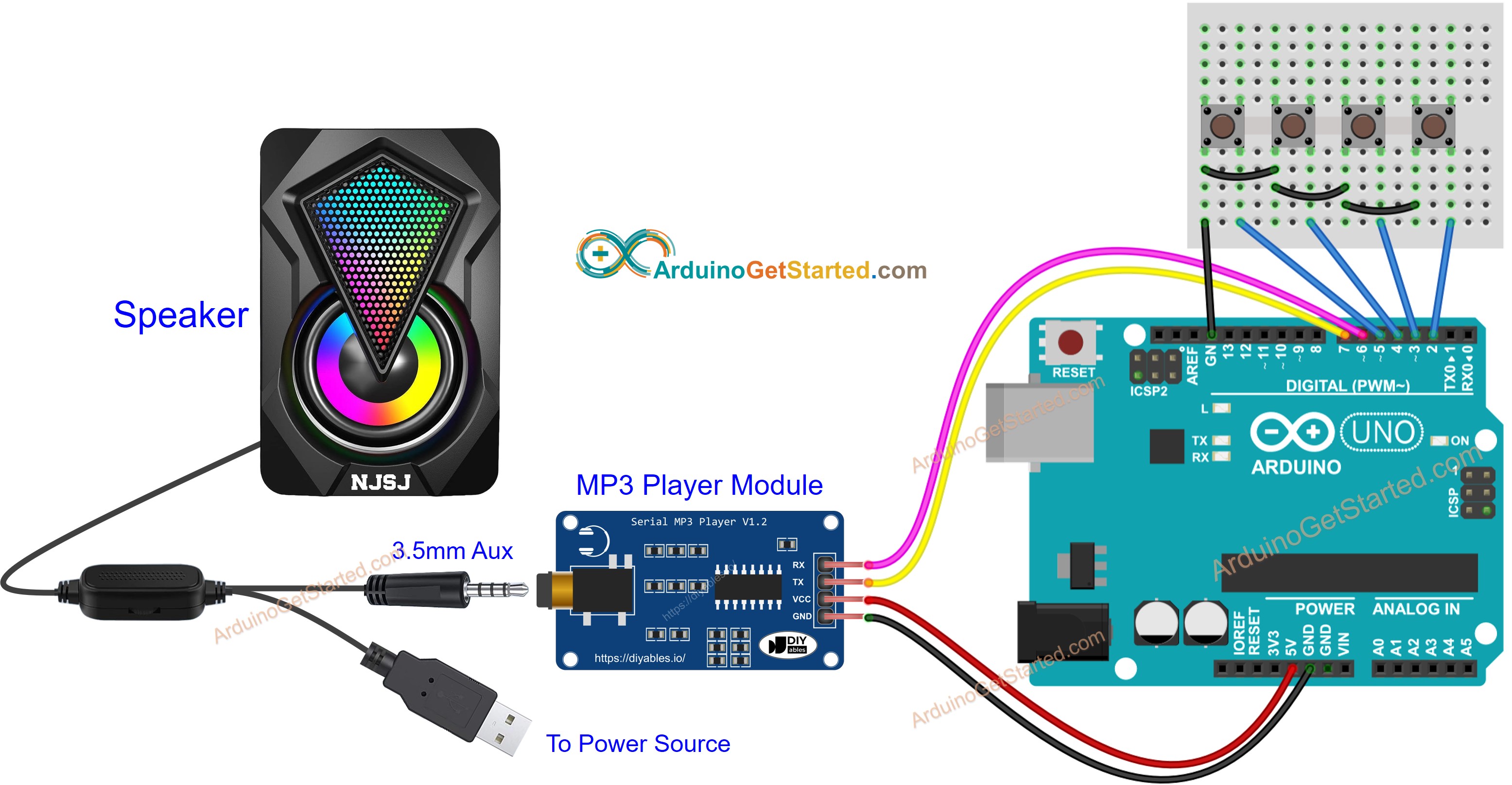
Diagrama de cableado del altavoz del reproductor MP3 de Arduino

This image is created using Fritzing. Click to enlarge image

Ahora puedes modificar los proyectos para añadir más funciones, por ejemplo:

  • Añade un potenciómetro para controlar el volumen, consulta el tutorial Arduino Potenciómetro tutorial
  • Añade un control remoto IR, consulta el tutorial Arduino Control Remoto IR tutorial
  • Añade un lector y una tarjeta RFID para hacer un reproductor MP3 RFID, consulta el tutorial Arduino RFID tutorial

Video Tutorial

Estamos considerando crear tutoriales en video. Si considera que los tutoriales en video son importantes, suscríbase a nuestro canal de YouTube para motivarnos a crear los videos.

Referencias de Funciones

※ NUESTROS MENSAJES

  • No dude en compartir el enlace de este tutorial. Sin embargo, por favor no use nuestro contenido en otros sitios web. Hemos invertido mucho esfuerzo y tiempo en crear el contenido, ¡por favor respete nuestro trabajo!