Arduino - Sensor de movimiento - Reproductor de MP3

En este tutorial, exploraremos el uso de Arduino, un sensor de movimiento HC-SR501 y un reproductor MP3 para activar la reproducción de un archivo de audio grabado al detectar movimiento. Este proyecto es versátil y puede adaptarse a aplicaciones como proporcionar instrucciones de audio grabadas o advertencias cada vez que se detecte la presencia de una persona.

Acerca del reproductor MP3 y del sensor de movimiento

Si no conoces un reproductor de MP3 y un sensor de movimiento (disposición de pines, cómo funciona, cómo programarlos...), aprende sobre ellos en los siguientes tutoriales:

Diagrama de Cableado
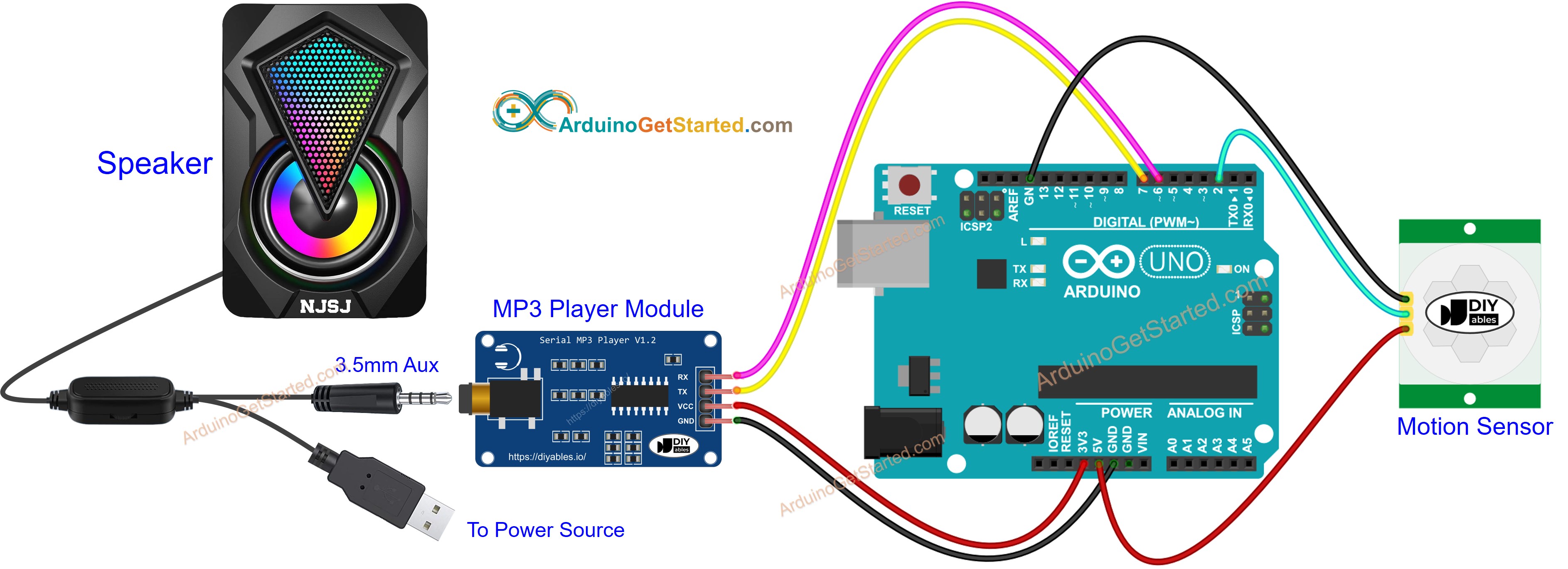
Diagrama de cableado de Arduino con sensor de movimiento y reproductor MP3

This image is created using Fritzing. Click to enlarge image

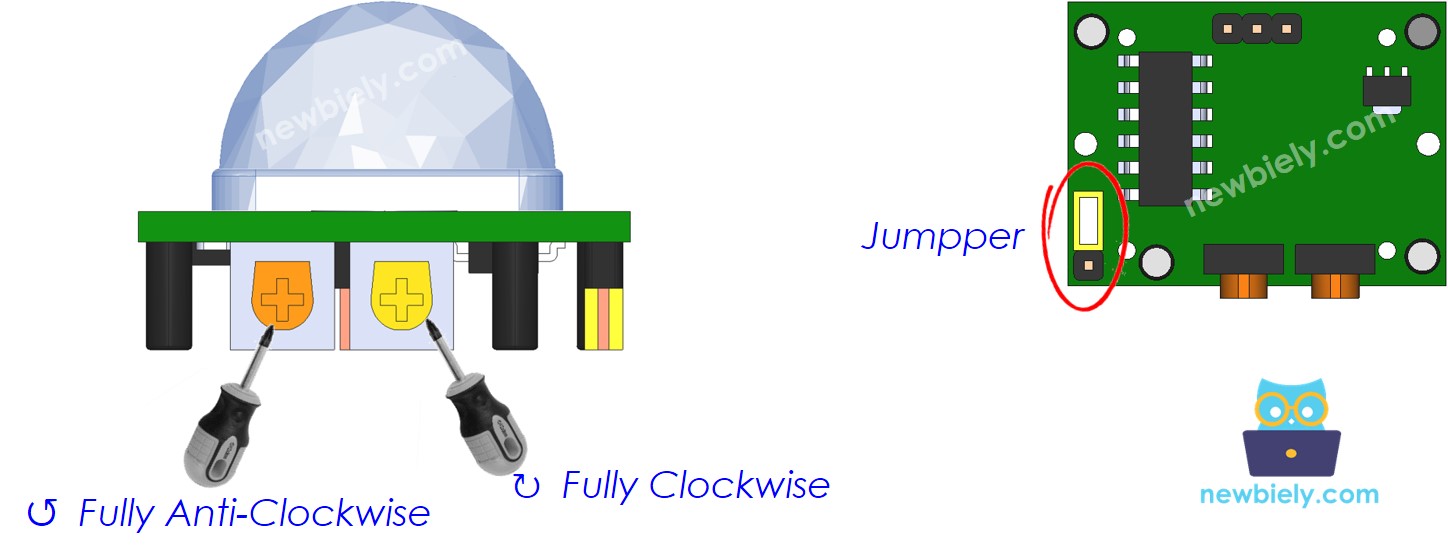
Configuración inicial del sensor de movimiento

Time Delay AdjusterScrew it in anti-clockwise direction fully.
Detection Range AdjusterScrew it in clockwise direction fully.
Repeat Trigger SelectorPut jumper as shown on the image.
Configuración inicial del sensor de movimiento de Arduino

Preparación

  • Almacene previamente el archivo MP3 grabado que queremos reproducir en la tarjeta microSD.
  • Inserte la tarjeta microSD en el módulo reproductor de MP3.
  • Conecte el módulo reproductor de MP3 al Arduino.
  • Conecte el altavoz al módulo reproductor de MP3.
  • Conecte el altavoz a una fuente de alimentación.
  • Conecte el sensor de movimiento al Arduino.

Código de Arduino - Sensor de movimiento controla el reproductor MP3

/* * Este código de Arduino fue desarrollado por es.newbiely.com * Este código de Arduino se proporciona al público sin ninguna restricción. * Para tutoriales completos y diagramas de cableado, visite: * https://es.newbiely.com/tutorials/arduino/arduino-motion-sensor-mp3-player */ #include <SoftwareSerial.h> #include <Servo.h> #define CMD_PLAY_NEXT 0x01 #define CMD_PLAY_PREV 0x02 #define CMD_PLAY_W_INDEX 0x03 #define CMD_SET_VOLUME 0x06 #define CMD_SEL_DEV 0x09 #define CMD_PLAY_W_VOL 0x22 #define CMD_PLAY 0x0D #define CMD_PAUSE 0x0E #define CMD_SINGLE_CYCLE 0x19 #define DEV_TF 0x02 #define SINGLE_CYCLE_ON 0x00 #define SINGLE_CYCLE_OFF 0x01 #define ARDUINO_RX 7 // Arduino Pin connected to the TX of the Serial MP3 Player module #define ARDUINO_TX 6 // Arduino Pin connected to the RX of the Serial MP3 Player module #define MOTION_SENSOR_PIN 2 // Arduino pin connected to motion sensor's pin SoftwareSerial mp3(ARDUINO_RX, ARDUINO_TX); int prev_motion_state; // the previous state of motion sensor int motion_state; // the current state of motion sensor void setup() { Serial.begin(9600); mp3.begin(9600); delay(500); // wait chip initialization is complete mp3_command(CMD_SEL_DEV, DEV_TF); // select the TF card delay(200); // wait for 200ms pinMode(MOTION_SENSOR_PIN, INPUT); // set arduino pin to input mode motion_state = digitalRead(MOTION_SENSOR_PIN); } void loop() { prev_motion_state = motion_state; // save the last state motion_state = digitalRead(MOTION_SENSOR_PIN); // read new state if (motion_state == LOW && prev_motion_state == HIGH) { // pin state change: LOW -> HIGH Serial.println("Motion detected!"); mp3_command(CMD_PLAY, 0x0000); // Play the first mp3 file } else if (motion_state == HIGH && prev_motion_state == LOW) { // pin state change: HIGH -> LOW Serial.println("Motion stopped!"); } } void mp3_command(int8_t command, int16_t dat) { int8_t frame[8] = { 0 }; frame[0] = 0x7e; // starting byte frame[1] = 0xff; // version frame[2] = 0x06; // the number of bytes of the command without starting byte and ending byte frame[3] = command; // frame[4] = 0x00; // 0x00 = no feedback, 0x01 = feedback frame[5] = (int8_t)(dat >> 8); // data high byte frame[6] = (int8_t)(dat); // data low byte frame[7] = 0xef; // ending byte for (uint8_t i = 0; i < 8; i++) { mp3.write(frame[i]); } }

Pasos R\u00e1pidos

  • Conectar Arduino al PC mediante un cable USB
  • Abrir Arduino IDE, seleccionar la placa y el puerto correctos
  • Copiar el código anterior y abrirlo con Arduino IDE
  • Haz clic en el botón Subir en Arduino IDE para subir el código al Arduino
  • Mueve la mano frente al sensor
  • Escucha el audio desde el reproductor de MP3

Video Tutorial

Estamos considerando crear tutoriales en video. Si considera que los tutoriales en video son importantes, suscríbase a nuestro canal de YouTube para motivarnos a crear los videos.

※ NUESTROS MENSAJES

  • No dude en compartir el enlace de este tutorial. Sin embargo, por favor no use nuestro contenido en otros sitios web. Hemos invertido mucho esfuerzo y tiempo en crear el contenido, ¡por favor respete nuestro trabajo!