Esta guía te muestra cómo conectar el ESP8266 a Internet o a tu red local utilizando el módulo Ethernet W5500. A continuación, estos son los temas que trataremos:
Conectar ESP8266 con el módulo Ethernet W5500
Programar ESP8266 para solicitudes web a través de Ethernet
Crear un servidor web básico en ESP8266 con Ethernet
Divulgación: Algunos de los enlaces proporcionados en esta sección son enlaces de afiliado de Amazon. Podemos recibir una comisión por las compras realizadas a través de estos enlaces sin costo adicional para usted. Apreciamos su apoyo.
Acerca del módulo Ethernet W5500
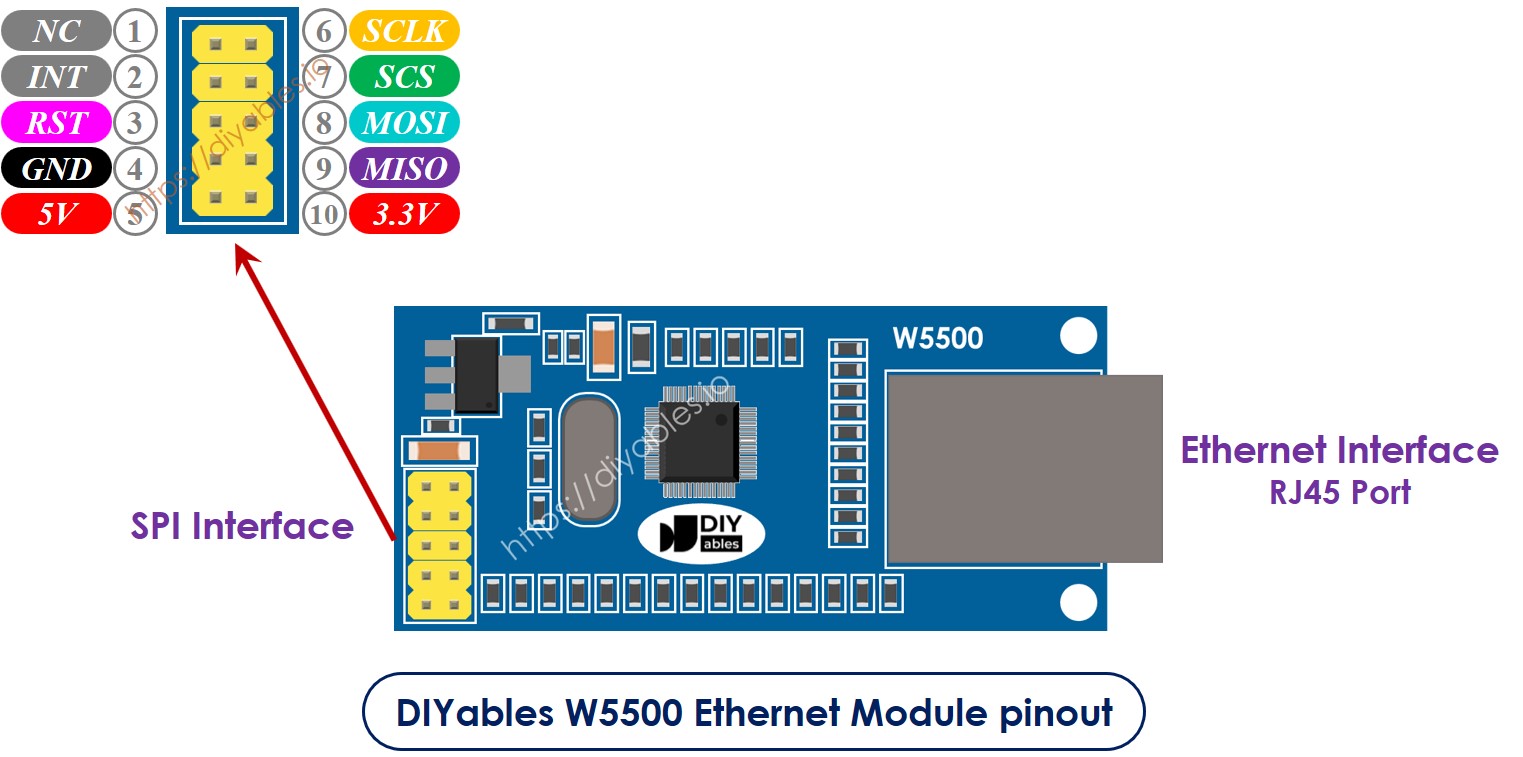
El módulo Ethernet W5500 tiene dos tipos de conexiones:
Interfaz RJ45: Conéctelo a un dispositivo de red como un enrutador o un conmutador usando un cable Ethernet.
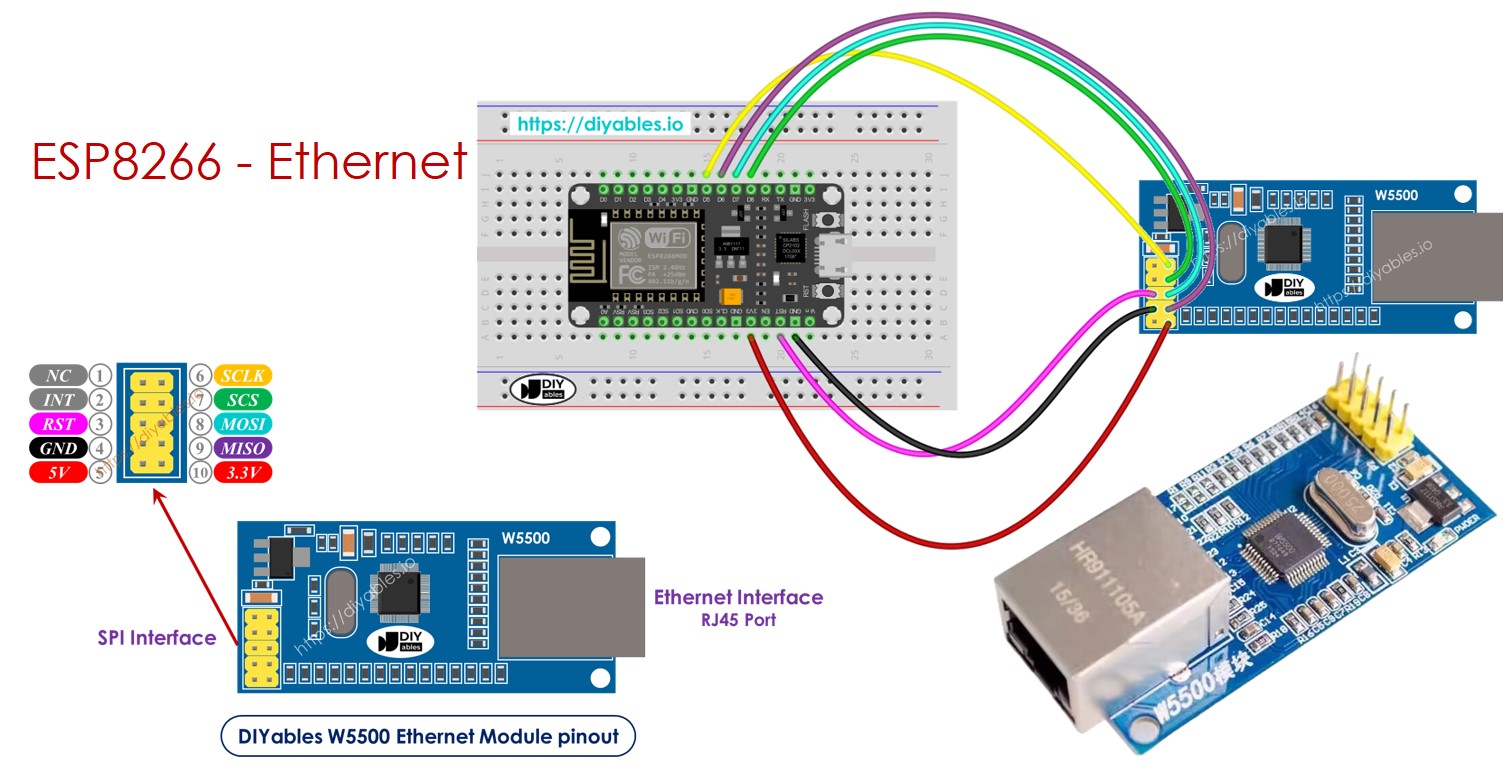
Interfaz SPI: Conéctelo a una placa ESP8266 usando las siguientes conexiones para sus 10 pines:
Pin NC: Deje este pin sin conectar.
Pin INT: Deje este pin sin conectar.
Pin RST: Conéctelo al pin de reinicio (EN) en el ESP8266.
Pin GND: Conéctelo al pin de tierra (GND) en el ESP8266.
Pin 5V: No conecte este pin.
Pin 3.3V: Conéctelo al pin de 3.3V en el ESP8266.
Pin MISO: Conéctelo al pin SPI MISO en el ESP8266.
Pin MOSI: Conéctelo al pin SPI MOSI en el ESP8266.
Pin SCS: Conéctelo al pin SPI CS (Chip Select) en el ESP8266.
Pin SCLK: Conéctelo al pin SPI SCK (Reloj) en el Arauthenticated.
image source: diyables.io
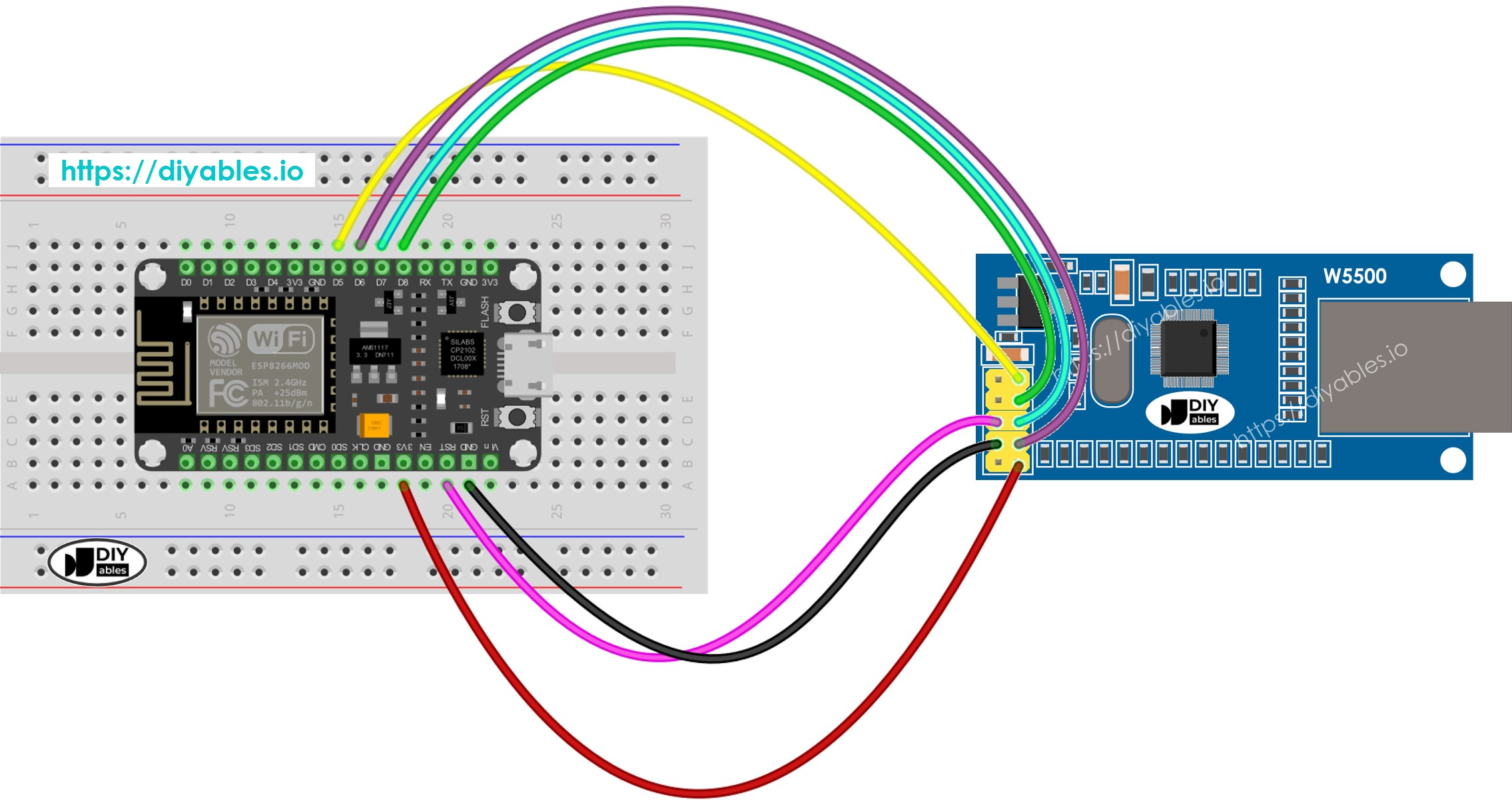
Diagrama de cableado entre ESP8266 y el módulo Ethernet W5500
This image is created using Fritzing. Click to enlarge image
Código ESP8266 para el Módulo Ethernet - Realizar una solicitud HTTP a través de Ethernet
Este código funciona como un cliente web. Envía solicitudes HTTP al servidor web en http://example.com/.
/* * Este código de ESP8266 NodeMCU fue desarrollado por es.newbiely.com * Este código de ESP8266 NodeMCU se proporciona al público sin ninguna restricción. * Para tutoriales completos y diagramas de cableado, visite: * https://es.newbiely.com/tutorials/esp8266/esp8266-ethernet*/#include <SPI.h>#include <Ethernet.h>// replace the MAC address below by the MAC address printed on a sticker on the Arduino Shield 2byte mac[] = { 0xDE, 0xAD, 0xBE, 0xEF, 0xFE, 0xEF };EthernetClient client;int HTTP_PORT = 80;String HTTP_METHOD = "GET"; // or POSTchar HOST_NAME[] = "example.com";String PATH_NAME = "/";voidsetup() {Serial.begin(9600);delay(1000);Serial.println("ESP8266 - Ethernet Tutorial");// initialize the Ethernet shield using DHCP:if (Ethernet.begin(mac) == 0) {Serial.println("Failed to obtaining an IP address");// check for Ethernet hardware presentif (Ethernet.hardwareStatus() == EthernetNoHardware)Serial.println("Ethernet shield was not found");// check for Ethernet cableif (Ethernet.linkStatus() == LinkOFF)Serial.println("Ethernet cable is not connected.");while (true) ; }// connect to web server on port 80:if (client.connect(HOST_NAME, HTTP_PORT)) {// if connected:Serial.println("Connected to server");// make a HTTP request:// send HTTP header client.println(HTTP_METHOD + " " + PATH_NAME + " HTTP/1.1"); client.println("Host: " + String(HOST_NAME)); client.println("Connection: close"); client.println(); // end HTTP headerwhile (client.connected()) {if (client.available()) {// read an incoming byte from the server and print it to serial monitor:char c = client.read();Serial.print(c); } }// the server's disconnected, stop the client: client.stop();Serial.println();Serial.println("disconnected"); } else { // if not connected:Serial.println("connection failed"); }}voidloop() {}
Pasos R\u00e1pidos
Para empezar con ESP8266 en el IDE de Arduino, siga estos pasos:
Conecta el módulo Ethernet a la placa ESP8266 como se muestra en el diagrama de cableado.
Usa un cable Ethernet para conectar el módulo Ethernet a tu router o switch.
Conecta la placa ESP8266 a tu ordenador usando un cable USB.
Abre Arduino IDE en tu ordenador.
Elige la placa ESP8266 correcta, por ejemplo (p. ej. NodeMCU 1.0 (ESP-12E Module)), y su puerto COM correspondiente.
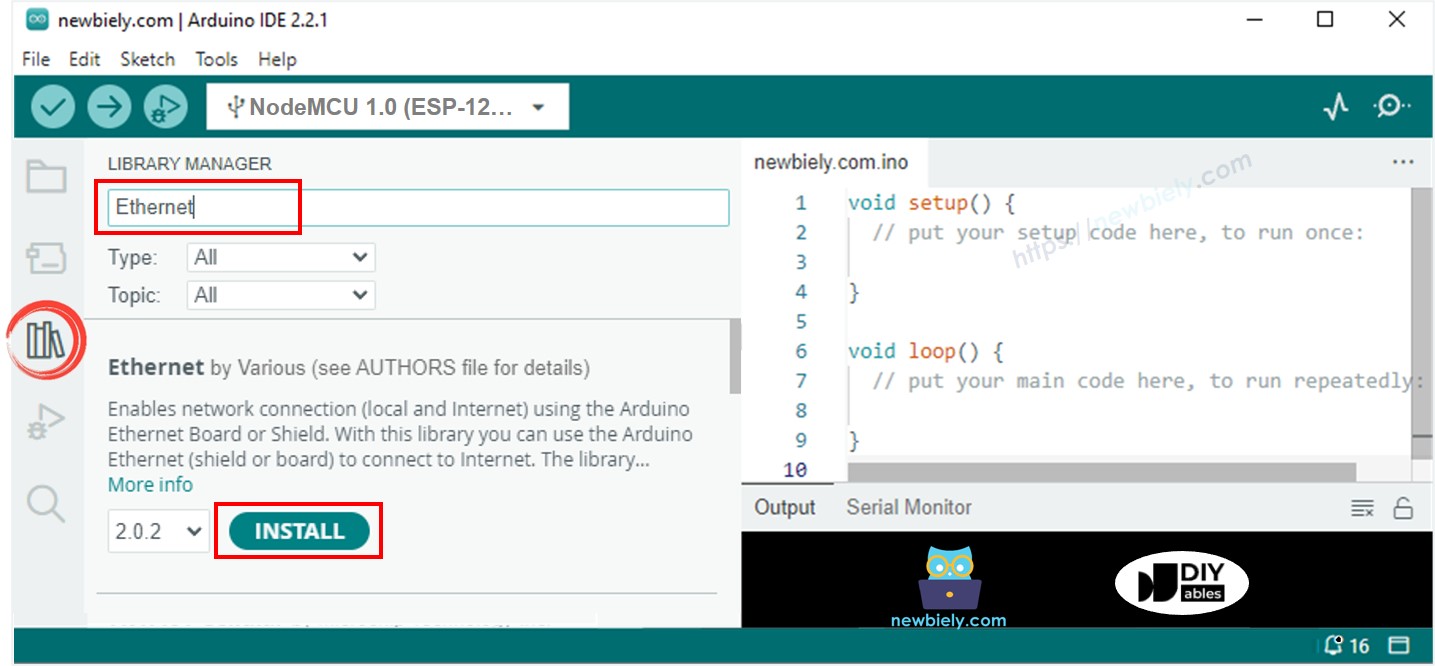
Haz clic en el icono Bibliotecas en la barra izquierda del Arduino IDE.
Busca Ethernet, luego encuentra la biblioteca Ethernet de Various.
Haz clic en el botón Instalar para instalar la biblioteca Ethernet.
Abre el Monitor Serial en el IDE de Arduino.
Copia el código proporcionado y pégalo en el IDE de Arduino.
Presiona el botón Subir en el IDE de Arduino para enviar el código al ESP25.
Consulta el resultado en el Monitor Serial, el cual mostrará el resultado como se muestra a continuación.
Newbiely | Arduino IDE 2.3.8
──
☐
✕
File
Edit
Sketch
Tools
Help
Nodemcu 1.0 (ESP-12E Module)
Newbiely.ino
···
8Serial.println("Hello World!");
Output
Serial Monitor
Message (Enter to send message to 'Nodemcu 1.0 (ESP-12E Module)' on 'COM15')
New Line
9600 baud
ESP8266 - Ethernet Tutorial
Connected to server
HTTP/1.1 200 OK
Accept-Ranges: bytes
Age: 208425
Cache-Control: max-age=604800
Content-Type: text/html; charset=UTF-8
Date: Fri, 12 Jul 2024 07:08:42 GMT
Etag: "3147526947"
Expires: Fri, 19 Jul 2024 07:08:42 GMT
Last-Modified: Thu, 17 Oct 2019 07:18:26 GMT
Server: ECAcc (lac/55B8)
Vary: Accept-Encoding
X-Cache: HIT
Content-Length: 1256
Connection: close
<!doctype html>
<html>
<head>
<title>Example Domain</title>
<meta charset="utf-8" />
<meta http-equiv="Content-type" content="text/html; charset=utf-8" />
<meta name="viewport" content="width=device-width, initial-scale=1" />
</head>
<body>
<div>
<h1>Example Domain</h1>
<p>This domain is for use in illustrative examples in documents. You may use this
domain in literature without prior coordination or asking for permission.</p>
<p><a href="https://www.iana.org/domains/example">More information...</a></p>
</div>
</body>
</html>
disconnected
Ln 11, Col 1
Nodemcu 1.0 (ESP-12E Module) on COM15
2
※ Nota:
Si otro dispositivo en la misma red tiene la misma dirección MAC, podría no funcionar correctamente.
Código ESP8266 para el módulo Ethernet - Servidor web
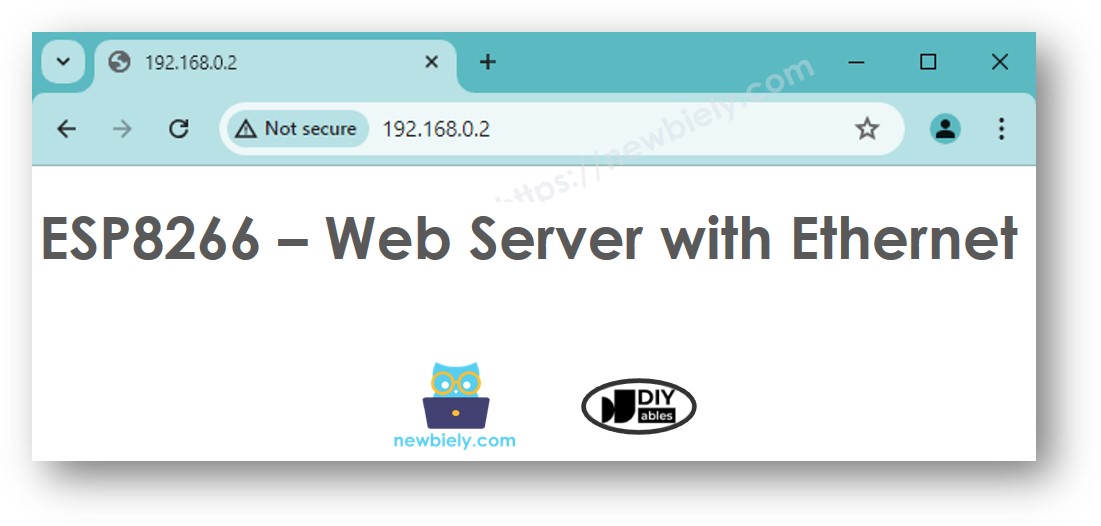
El código a continuación transforma el ESP8266 en un servidor web. Este servidor entrega una página web básica a los navegadores de Internet.
/* * Este código de ESP8266 NodeMCU fue desarrollado por es.newbiely.com * Este código de ESP8266 NodeMCU se proporciona al público sin ninguna restricción. * Para tutoriales completos y diagramas de cableado, visite: * https://es.newbiely.com/tutorials/esp8266/esp8266-ethernet*/#include <SPI.h>#include <Ethernet.h>// replace the MAC address below by the MAC address printed on a sticker on the Arduino Shield 2byte mac[] = { 0xDE, 0xAD, 0xBE, 0xEF, 0xFE, 0xEF };EthernetServer server(80);voidsetup() {Serial.begin(9600);delay(1000);Serial.println("ESP8266 - Ethernet Tutorial");// initialize the Ethernet shield using DHCP:if (Ethernet.begin(mac) == 0) {Serial.println("Failed to obtaining an IP address");// check for Ethernet hardware presentif (Ethernet.hardwareStatus() == EthernetNoHardware)Serial.println("Ethernet shield was not found");// check for Ethernet cableif (Ethernet.linkStatus() == LinkOFF)Serial.println("Ethernet cable is not connected.");while (true) ; } server.begin();Serial.print("ESP8266 - Web Server IP Address: ");Serial.println(Ethernet.localIP());}voidloop() {// listen for incoming clientsEthernetClient client = server.available();if (client) {Serial.println("new client");// an HTTP request ends with a blank linebool currentLineIsBlank = true;while (client.connected()) {if (client.available()) {char c = client.read();Serial.write(c);// if you've gotten to the end of the line (received a newline// character) and the line is blank, the HTTP request has ended,// so you can send a replyif (c == '\n' && currentLineIsBlank) {// send a standard HTTP response header client.println("HTTP/1.1 200 OK"); client.println("Content-Type: text/html"); client.println("Connection: close"); // the connection will be closed after completion of the response client.println(); client.println("<!DOCTYPE HTML>"); client.println("<html>"); client.println("<body>"); client.println("<h1>ESP8266 - Web Server with Ethernet</h1>"); client.println("</body>"); client.println("</html>");break; }if (c == '\n') {// you're starting a new line currentLineIsBlank = true; } elseif (c != '\r') {// you've gotten a character on the current line currentLineIsBlank = false; } } }// give the web browser time to receive the datadelay(1);// close the connection: client.stop();Serial.println("client disconnected"); }}
Pasos R\u00e1pidos
Copia el código anterior y pégalo en el IDE de Arduino.
Haz clic en el botón Subir en el IDE de Arduino para transferir el código al ESP8266.
Verifica los resultados en el Monitor serie; se mostrarán tal como se describen.
Newbiely | Arduino IDE 2.3.8
──
☐
✕
File
Edit
Sketch
Tools
Help
Nodemcu 1.0 (ESP-12E Module)
Newbiely.ino
···
8Serial.println("Hello World!");
Output
Serial Monitor
Message (Enter to send message to 'Nodemcu 1.0 (ESP-12E Module)' on 'COM15')
New Line
9600 baud
ESP8266 - Ethernet Tutorial
ESP8266 - Web Server IP Address: 192.168.0.2
Ln 11, Col 1
Nodemcu 1.0 (ESP-12E Module) on COM15
2
Copie la dirección IP dada arriba y introdúzcala en la barra de direcciones de su navegador. Verá una página web simple mostrada por el ESP8266.
Tutoriales Relacionados
※ NUESTROS MENSAJES
No dude en compartir el enlace de este tutorial. Sin embargo, por favor no use nuestro contenido en otros sitios web. Hemos invertido mucho esfuerzo y tiempo en crear el contenido, ¡por favor respete nuestro trabajo!